Local AI upscaling

Upscale images, video and audio on your own computer.

TouchUp installs and drives open-source engines like Real-ESRGAN, SeedVR2 and AudioSR, and takes care of everything around them: frames, soundtracks, queues and before/after comparisons. Nothing is uploaded.

For Windows, macOS and Linux · Free and open source, Apache 2.0

TouchUp's icon, half pixelated and half smooth
Original Upscaled

drag to compare

The studio

See the result before you commit.

Scrub to any moment of a video and upscale just that frame. A split view with zoom and pan puts the original next to the result, so you pick the engine and settings on one frame, not on an hour of footage.

TouchUp's studio: a video frame split into the original and the upscaled result, with the engine list on the right and the timeline below

Images

Photos, drawings and anime art, by 2x, 3x or 4x. Images go straight to the queue, with no preview step.

PNG · JPEG · WebP · BMP · TIFF

Video

To 720p, 1080p, 1440p or 4K. Frames stream through the engine a segment at a time, and the original soundtrack is kept.

MP4 · MOV · MKV · WebM → H.264 · H.265 · ProRes

Audio

Choose 5–30 seconds on the waveform, enhance only that, then play both versions and compare their spectrograms.

WAV · FLAC · MP3 · M4A · OGG → WAV · FLAC · MP3

Features

Everything around the engine.

TouchUp doesn't upscale anything itself. It does the work that makes command-line upscalers pleasant to use.

Any engine

A built-in catalog installs with one click. Add any other command-line upscaler from a form or a JSON manifest.

Models one by one

Engines with large weights list their models; download only the ones you want, with checksums verified.

A scale or a resolution

2x, 3x or 4x, or 720p to 4K by the short side, so portrait video works too. Results are resized exactly with Lanczos.

A queue you can watch

Jobs run one at a time with live progress, the engine's latest output, cancel and retry, and a warning when an engine goes quiet.

Find the fastest

Times an engine's settings on two seconds of your video, keeps each that's faster and saves the winners.

GPU memory stays on the GPU

Python engines stop with "out of memory" instead of spilling into system memory, which is often ten times slower. One setting turns spilling back on.

Filters in plain Go

Deinterlace, deblock, denoise and deband before the engine; sharpen, brightness, contrast, warmth, saturation and film grain after.

Errors you can report

Every failure has a Copy button: what failed, the version, system, GPU setting, Python and everything the engine printed.

26 languages

From Bulgarian to Ukrainian, each with its own number formats, plus dark and light themes and "Open with TouchUp" on every desktop.

Engines

The strongest open models, one click away.

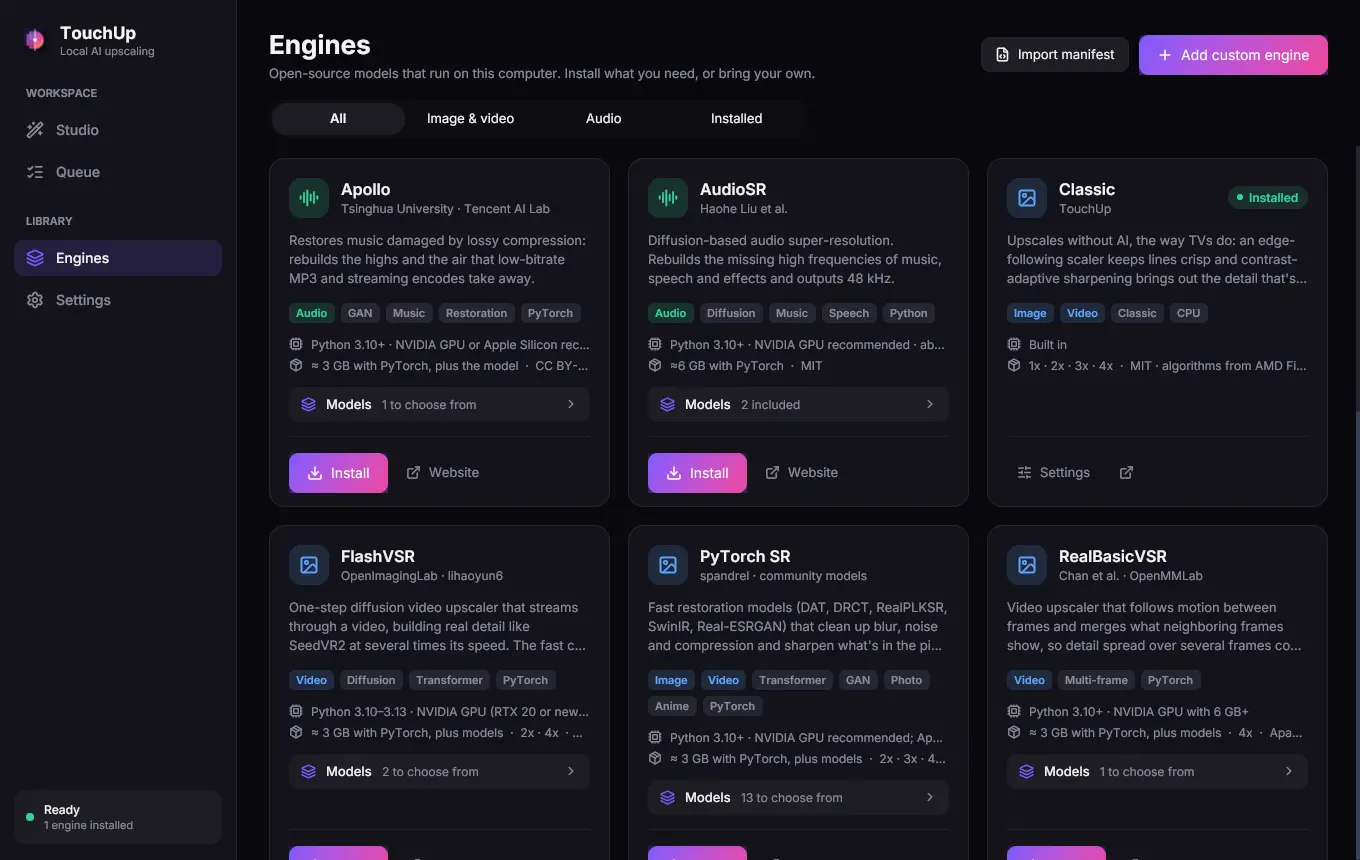
Each engine installs into its own folder, Python engines into a private environment with a Python TouchUp downloads for them. Each keeps its own license, shown on its card.

  • ClassicIMGVIDBuilt in. An edge-adaptive scaler and contrast-adaptive sharpening, instant on the CPU.
  • RTX VideoIMGVIDBuilt in on Windows. NVIDIA's Video Super Resolution from the graphics driver.
  • SeedVR2VIDIMGOne-step diffusion restoration with real, steady texture.
  • FlashVSRVIDStreaming diffusion with detail like SeedVR2's at several times the speed.
  • RealBasicVSRVIDFollows motion and merges neighboring frames.
  • PyTorch SRIMGVID13 community models through spandrel: DAT2, RealPLKSR, DRCT-L, ATD, SwinIR-L and more.
  • Real-ESRGAN · Real-CUGAN · waifu2x · RealSRIMGVIDFast ncnn builds on any Vulkan GPU.
  • Apollo · AudioSRAUDMusic damaged by compression; bandwidth extension to 48 kHz.
  • VoiceFixer · Resemble Enhance · DeepFilterNetAUDRestoring, enhancing and denoising speech.
TouchUp's Engines page: cards for Apollo, AudioSR, Classic, FlashVSR, PyTorch SR and RealBasicVSR with install buttons

Missing one? Add custom engine takes a program and its arguments with placeholders like {input}, {output} and {scale}.

How it works

Long videos, small work folder.

Videos go through image engines a segment at a time, straight from the decoder to the encoder, so the work folder never holds more than a few hundred megabytes, however long the video. Everything runs on this computer with the engines you install.

01ffmpegdecodes frames into a pipe
02filtersclean up the source in memory
03engineupscales a few dozen frames at once
04encoderwrites them, with the original sound

Get TouchUp

Download the latest release for your computer.

Needs FFmpeg with ffprobe, and a Vulkan GPU for the ncnn engines. Python engines get their own Python; an NVIDIA GPU is strongly recommended for diffusion models.

Privacy

Your media stays on your computer.

This is TouchUp's privacy policy, for every version: the downloads on GitHub and the Microsoft Store. TouchUp has no account, no analytics, no ads and no crash reporting, and its developer runs no server it talks to.

What TouchUp collects

Nothing. TouchUp sends its developer no data of any kind, and it doesn't track you across apps or websites.

Your images, video and audio

They are never uploaded. The engines run on your own computer, and results are written next to the original or to the output folder you choose. Frames and clips in progress go to a work folder in the system's temporary folder, which TouchUp empties when it starts and quits.

What's kept on your computer

Your settings, the engines and models you install, and engines you add yourself, in TouchUp's own folder (%LOCALAPPDATA%\TouchUp, ~/Library/Application Support/TouchUp or ~/.local/share/TouchUp). Deleting that folder removes them; uninstalling the Microsoft Store version removes them too.

The internet, only when you install

When you install an engine or a model, TouchUp downloads it from where its authors publish it: GitHub, Hugging Face, the Python Package Index, PyTorch's download server and, for one engine, OpenMMLab's. Python engines also get a standalone Python from GitHub. Those sites see each request as they see any download (your IP address, and what pip reports about your system and Python) under their own privacy policies. TouchUp uses no network while it upscales, though some engines fetch their own model files from their authors the first time they run.

Engines are their own programs

The engines are open-source programs by other authors, and engines you add yourself can be anything. TouchUp passes them only the files you ask it to process. Links on an engine's card open its page in your browser.

Error reports are yours to send

Copy on an error puts a report on your clipboard: what failed, TouchUp's version, your system, GPU setting and Python, and what the engine printed. Nothing is sent unless you paste it somewhere, such as a GitHub issue.

Questions: open an issue on GitHub. Last updated November 19, 2026. Changes are published here and in the source repository.