Free for Windows, macOS and Linux

Files lie. AnyFile doesn't.

A file's name is only a label. AnyFile reads what's actually inside, tells you what it really is, opens up everything packed within it, and hands each part to the app you already use for it.

Latest release on GitHub
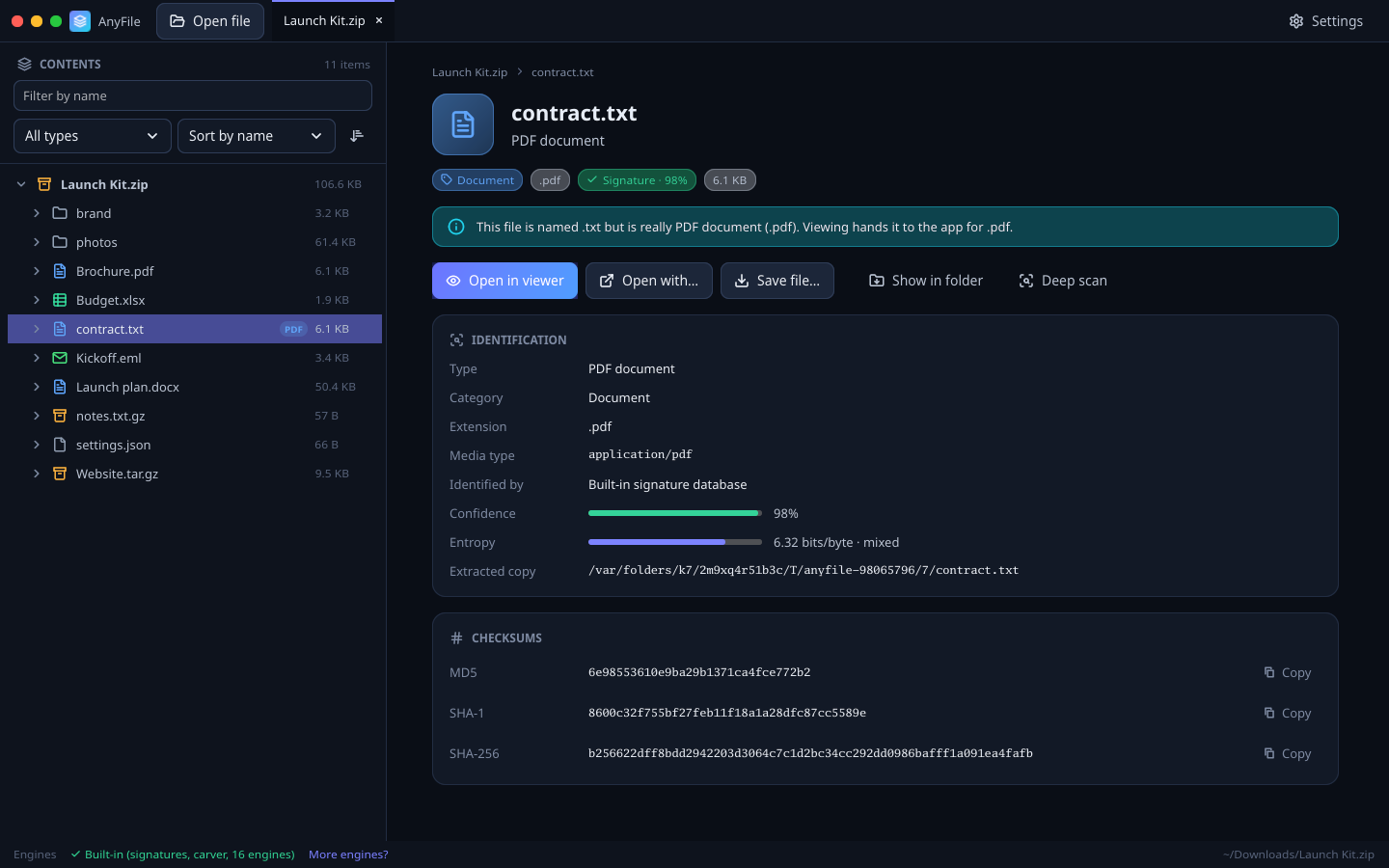
AnyFile showing that a file named contract.txt is really a PDF document
Try it

Drop a file. See what it really is.

A quick taste of what the app does, right here. Your file is read by your browser and never leaves this page.

What it does

Identify. Explore. Open.

Three things, done thoroughly. AnyFile never renders content itself, so every part opens in the app made for it.

Identifies anything

Built-in signatures and structural probes go first. When they're unsure, it asks Magika and TrID, then falls back to its own analysis of text, encodings, entropy and embedded objects.

Explores inside

Archives, Office files, PDFs, installers, executables, mail, disc images, media and encoded blobs. Expand anything with contents, and keep going as deep as it goes.

Opens in your apps

"Open in viewer" hands each item to the app your system uses for its real type. A spreadsheet named report.dat opens in your spreadsheet app. Save one item or extract the lot.

All the way down

Containers inside containers inside containers.

Files hide files. AnyFile follows every layer, so nothing stays buried.

  1. 1Open an email. Its bodies and attachments become a tree.
  2. 2Expand the zip attached to it. Every member is identified by what it contains, not its name.
  3. 3Expand the spreadsheet inside the zip. Office files are containers too.
  4. 4Open the chart image in your image viewer, or save it anywhere.
Take the tour

Made to look at files closely.

16
built-in engines
45
interface languages
3
desktop platforms
0
files sent anywhere
Under the hood

Engines for every kind of container.

Built in, plus optional tools AnyFile can install for you from their publishers, checked and kept to your account.

ZIP, TAR and compressors docx, xlsx, jar, apk, epub OLE compound files doc, xls, msi, msg Executables PE, ELF, Mach-O PDF attachments, images, fonts Email eml, mht, mbox Disc images ISO 9660, Joliet Encoded blobs base64, data: URIs Signature carver deep scan 7-Zip 7z, rar, cab, dmg, installers FFmpeg media streams, cover art Magika Google's file type model TrID 18,000+ definitions

Dashed: optional engines, installed from Settings in the GitHub download.
Download

Get AnyFile. It's free.

The latest release, straight from GitHub.

Windows
Installer, x64.exe Installer, ARM64.exe Portable, x64.zip Portable, ARM64.zip
The installer adds "Inspect with AnyFile" to Explorer's right-click menu.
macOS
Disk image, Apple silicon and Intel.dmg App in a zip.zip
macOS 11 or later. Signed and notarized.

Coming soon to the Mac App Store and the Microsoft Store. The Mac App Store version has the built-in engines only.

Privacy policy

Your files stay yours.

AnyFile works entirely on your computer. It has no accounts, no ads, no analytics and no tracking, and it never sends your files, or anything about them, to the developer or anyone else.

What stays on your computer

  • Every file you open is read and analyzed locally, by AnyFile's own engines or the optional tools installed on your computer.
  • Items you view are copied to a temporary folder (the system's, or one you choose in Settings) so your own apps can open them. Items you save or extract go only where you choose.
  • Your settings, including tool paths, are kept in AnyFile's settings file in your user folder.
  • Optional tools you install from Settings live in AnyFile's folder in your account, for example ~/Library/Application Support/AnyFile/tools.

When AnyFile goes online

  • Update check: copies downloaded from GitHub ask GitHub for the latest release at startup; turn it off in Settings. Store copies don't check: the store updates them.
  • Installing tools: only when you ask, AnyFile downloads TrID, Magika, 7-Zip or FFmpeg from their publishers (including GitHub). The Mac App Store version can't install tools.
  • Links you click, such as Donate, open in your browser.

These requests carry no information about your files. GitHub and the tools' publishers see your IP address, as any website does; their own privacy policies apply.

Permissions

  • AnyFile reads only the files you open, drop on it or send to it with "Inspect with AnyFile", and writes only where you save or extract.
  • On the Mac App Store, the App Sandbox enforces this: it can reach only the files and folders you choose.

Children, changes and contact

  • AnyFile collects no personal information from anyone, including children.
  • If this policy changes, the new version is published here with a new date.
  • Questions: open an issue at github.com/xmhrnx/anyfile/issues.

Effective 19 November 2026. This website loads the latest version number from GitHub and reads files you drop on it only in your browser.